
 Digital Recipe
 Digital Planner
 Travel Planner
planning season is here
The 2027 Digital Planner for Moms
One hyperlinked planner for your days, your kids’ schedules, meals, home and budget. Here is exactly what’s inside, what a real day and week look like in it, and how to tell whether it’s the right fit for you.

The short answer
If you want one dated planner for all of 2027 that holds your family’s schedule, meals, the kids’ school details and your budget, and you plan on an iPad or Android tablet, the Mama’s Family Planner 2027 was built for that. If you often skip weeks or hate seeing blank dated pages, an undated planner is the better fit. Both are compared below so you can decide in a couple of minutes.
What’s inside
Every section, and what you’ll actually use it for
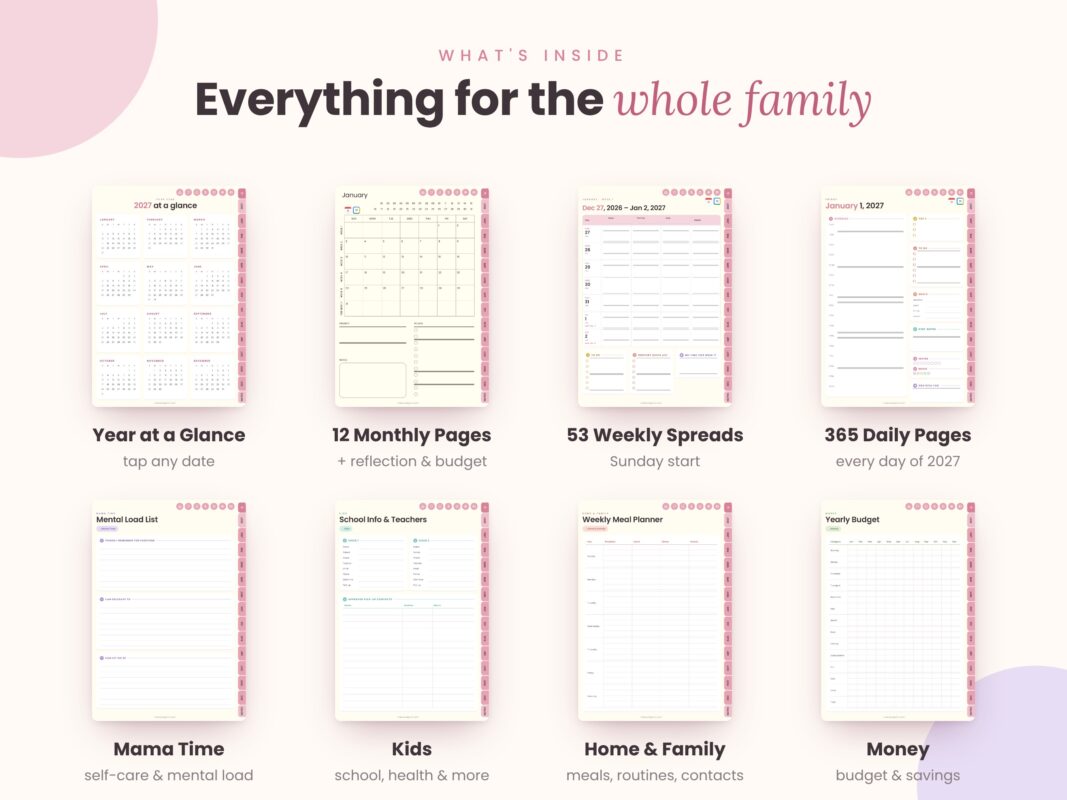
A planner is only useful if you know where things go. This table maps every part of the 2027 planner to the job it does in a busy family week. Every page has side tabs for each month, top icons for each section and a link back to the index, so nothing is more than a tap or two away.
| Section | What’s included | Use it for |
|---|---|---|
| Index & Year at a Glance | A clickable index to every section, plus a 2027 calendar where every date links to its daily page | Getting anywhere in one tap |
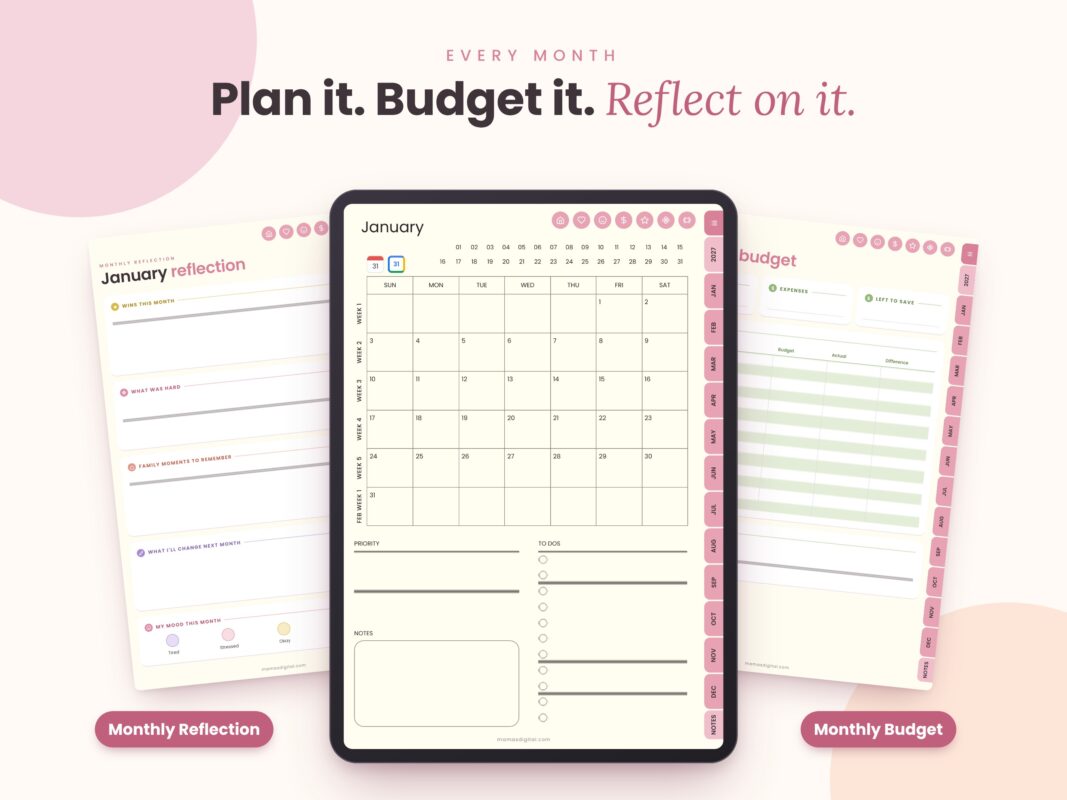
| Monthly (12) | Calendar grid with week links, Priority box and To Do list, Monthly Reflection, Monthly Budget | Birthdays, bills, school holidays and an end-of-month reset |
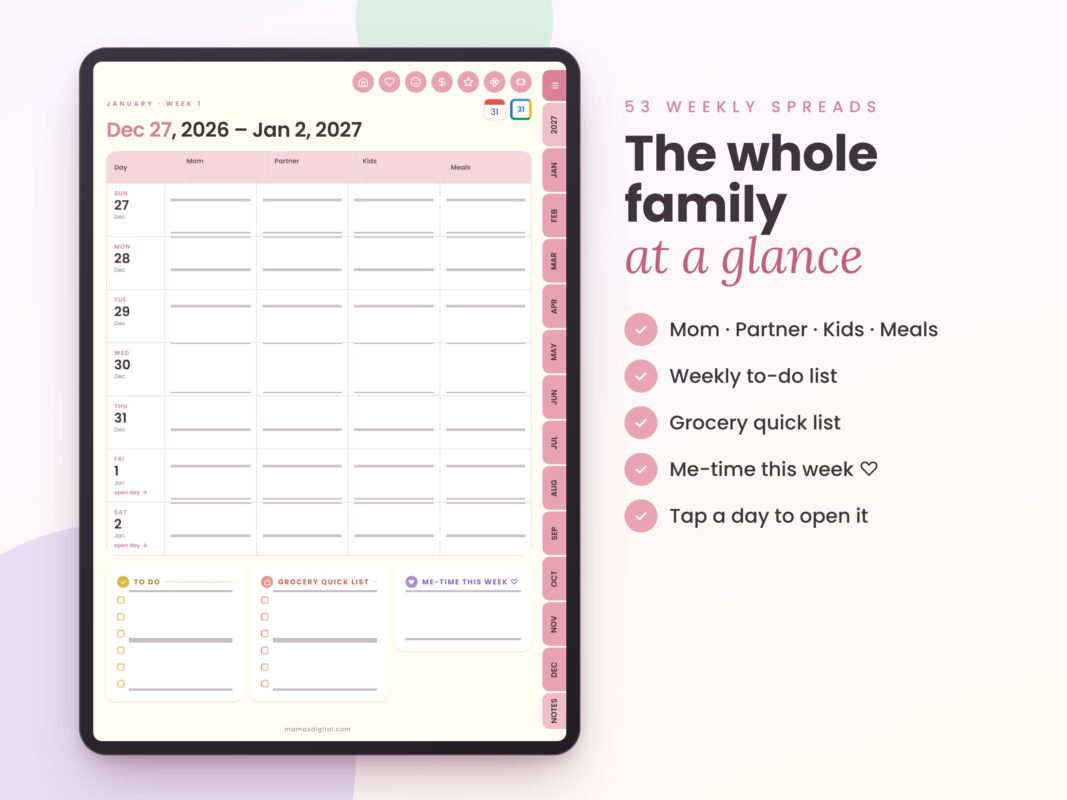
| Weekly (53) | Rows for Mom, Partner, Kids and Meals each day, To Do list, Grocery Quick List, Me-Time This Week | Your Sunday planning session |
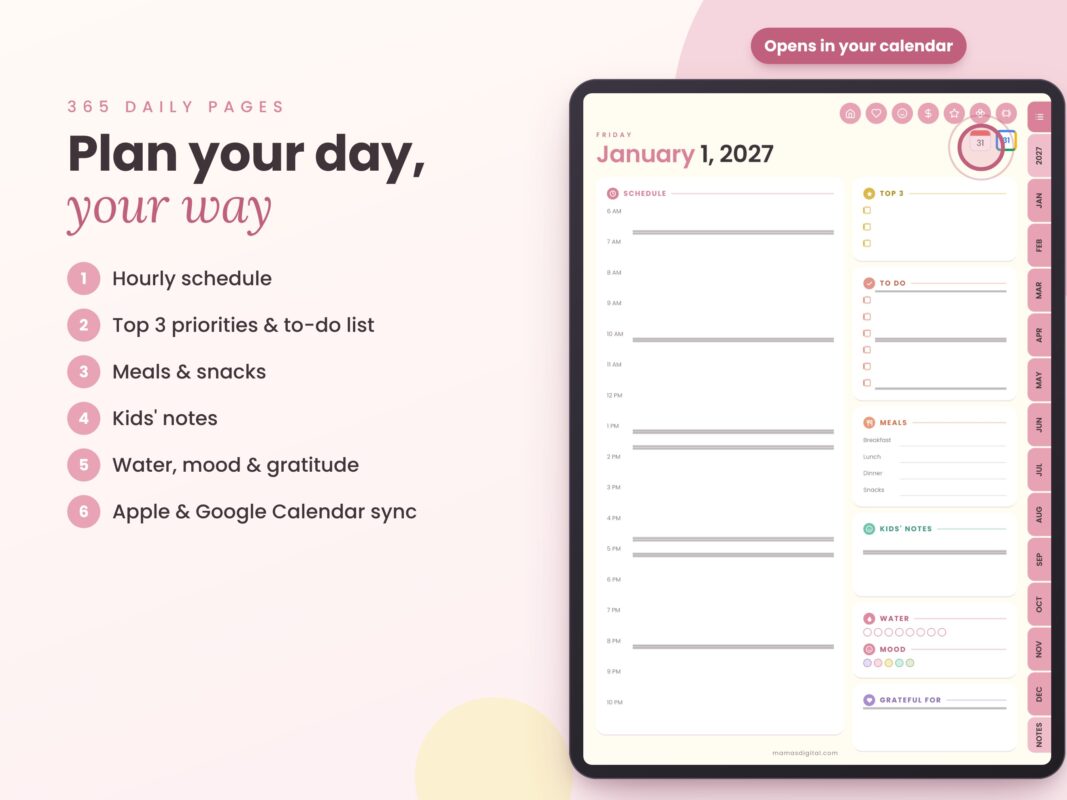
| Daily (365) | Hourly schedule, Top 3, To Do, Breakfast/Lunch/Dinner/Snacks, Kids’ Notes, water, mood, Grateful For | Your everyday page |
| Mama Time (9) | Brain Dump, Mental Load List, Me-Time Planner, Self-Care Menu, Gratitude Journal, Date Night Ideas, Vision Board, Letter to Myself, Wheel of Life | Getting things out of your head |
| Wellness (7) | Mood, Sleep, Meal & Nutrition, Skincare, Period, Medication & Supplements, Therapy Notes | Noticing patterns in how you feel |
| Fitness (5) | Workout Planner, Fitness Goals, Water & Steps, monthly Body Measurements, Progress Photos | Small, steady movement goals |
| Kids (12) | Weekly schedule, school info with approved pick-up contacts, class schedule, homework, grades (4 terms), reading list, activities, lunchbox planner, chores, behavior & rewards, health & vaccine record, birthday party planner | Everything school and activities ask you to remember |
| Goals & Projects (8) | Priority Matrix, Project Planner, WFH Planner, 30-Day Challenge, Mind Map, Bucket List, Books & Movies, Outfit Planner | Work-from-home days and personal goals |
| Home & Family (12) | Weekly meal planner, grocery list by aisle, recipe cards, cleaning checklist, family routine, doctor’s appointments, emergency contacts, babysitter info, birthdays, gift & holiday planner, travel & packing, contacts & logins | Running the house |
| Money (9) | Financial overview, yearly budget (13 categories × 12 months), income, spending, bill checklist, subscriptions, $1,000 savings challenge, debt snowball, credit card payoff | Seeing where the money goes |
| Notes (6 styles) | Dotted, grid, lined, blank, half page, and a kids’ doodle page | Everything else, plus keeping little hands busy |

A real day
What a daily page looks like when it’s filled in
Most planners look calm when they’re empty. Here is a realistic weekday so you can see how the daily layout handles a full mom schedule. The trick is the Top 3 box: it forces you to choose what matters today, so the rest of the list stops feeling like a failure.
Top 3
- Send the school trip form
- Book the dentist for both kids
- Finish the work report by 1 pm
Schedule
- 7:15 school run
- 9:00 to 1:00 work block
- 3:30 swimming lesson
- 6:30 family dinner
Meals
- Breakfast: overnight oats
- Lunch: leftover rice and dal
- Dinner: chicken wraps (prep at 5)
- Snacks: apples, crackers
Kids’ notes
- Library book due Thursday
- Swim bag needs a new towel
Check-in
Water 6 of 8 · Mood: tired but okay · Grateful for: ten quiet minutes with my tea
Notice what is not on the page: a 20-item to-do list. Anything that doesn’t make the Top 3 goes on the To Do list or into the Brain Dump in the Mama Time section, where it can wait without nagging you.
A real week
The weekly spread: one page for the whole family
The weekly pages are where this planner differs most from a general life planner. Each day has its own row for Mom, Partner, Kids and Meals, so you can see clashes before they happen. Here is how a filled week might look:
| Day | Mom | Partner | Kids | Meals |
|---|---|---|---|---|
| Mon | Work 9 to 5 | School pick-up | Football 4 pm | Pasta bake |
| Tue | Dentist calls | Late meeting | Swimming 3:30 | Chicken wraps |
| Wed | Gym, 30 min | Cooks dinner | Library day | Leftovers |
| Thu | Parent-teacher meeting | Bedtime routine | Library book due | Dal and rice |
| Fri | Early finish | Grocery run | Movie night | Homemade pizza |
Tip: the Partner row makes handing off tasks easier. Send your partner a screenshot of the week on Sunday night so nobody is surprised on Thursday.
Under the day rows, the week also has a To Do list, a Grocery Quick List (so the meal plan turns straight into a shopping list) and a Me-Time This Week box. Fill the Me-Time box first. If it’s not planned, it usually doesn’t happen.
The monthly reset
Reflection and budget, built into every month
Each of the 12 months has three pages: the calendar, a Monthly Reflection and a Monthly Budget. The reflection asks five honest questions: wins this month, what was hard, family moments to remember, what you’ll change next month, and a mood check-in. Twenty minutes on the last Sunday of the month is plenty.
The budget page tracks income, expenses and what’s left to save, then a spending plan with Budget, Actual and Difference columns. A filled example:
| Category | Budget | Actual | Difference |
|---|---|---|---|
| Groceries | $450 | $482 | −$32 |
| Kids’ activities | $120 | $120 | $0 |
| Eating out | $80 | $45 | +$35 |
| Household | $60 | $71 | −$11 |
Example figures only. Use your own currency and categories.
You don’t need a perfect system. You need one place to put it all, and a page that’s ready when you open it.
Dated or undated?
Which Mama’s Digital planner fits you
The biggest decision is not the color. It’s whether you want dates already filled in. Dated planners save setup time and let you tap straight to any day. Undated planners never “waste” pages when life gets busy. Here’s an honest side-by-side:
| Family Planner 2027 | Mom Life Undated | 2026 Ultimate Life Planner | |
|---|---|---|---|
| Dates | Dated, Jan 1 to Dec 31, 2027 | Undated, start any time | Dated, 2026 only |
| Price | $21.99 | $24 (all 4 color themes) | $14.99 (all 4 color themes) |
| Standout feature | Mom / Partner / Kids / Meals rows on every week | Reusable year after year | Quarterly planning and vision boards |
| Calendar buttons | Apple & Google on daily, weekly, monthly pages | — | Google & Apple Calendar integration |
| Choose it if | You plan most days and want 2027 ready to go | You plan in bursts or want to reuse it | You want to plan the rest of 2026 right now |
Prices as listed in October 2026.
Not sure? Ask yourself one question: how many days last month did you open your planner? If it was most days, go dated. If it was a handful, go undated, so you never feel behind.
Apps and devices
What you need to use it
The planner is a single hyperlinked PDF, about 24 MB. It works in any note-taking or PDF app that supports links, on iPad or Android tablets. You’ll also want a stylus if you like handwriting, though typing with text boxes works too.
| App | Devices | Good to know |
|---|---|---|
| GoodNotes | iPad, plus Android and Windows versions | The most common choice for hyperlinked planners |
| Notability | iPad | Import the PDF as a new note |
| Noteshelf | iPad and Android | Handwriting-focused alternative |
| Samsung Notes | Samsung Galaxy tablets | Comes preinstalled on Galaxy tablets |
| Xodo | iPad and Android | Free PDF app |
| Flexcil | iPad and Android | PDF annotation app with link support |
Setup
Set it up in 10 minutes
Download on Wi-Fi
After checkout, download the PDF from your order confirmation or your account. At around 24 MB, Wi-Fi is quicker than mobile data.
Import it into your app
In GoodNotes, tap the + button, choose Import and select the PDF. Other apps have a similar Import or Open In option.
Test three links
Tap a month tab, then a date, then the link back to the index. If nothing happens, switch off your pen tool or use your app’s read-only mode, then tap again.
Jump to today
Open Year at a Glance and tap today’s date. Start here, not on January 1.
Try a calendar button once
Tap the Apple or Google Calendar button on a page. It opens that exact date in your calendar app, which is handy for checking appointments.
Book a 10-minute Sunday slot
Put a recurring reminder in your phone for your weekly plan. The planner works best with one fixed planning moment a week.
Back it up
Turn on your app’s cloud backup (iCloud, Google Drive or similar) so a lost or broken tablet doesn’t take a year of notes with it.
Making it last
How to actually stick with a digital planner
Most planners are abandoned by February, and it’s rarely the planner’s fault. These habits make the difference:
Skip the guilt pages
Missed a week? Don’t go back and fill it in. Tap today and carry on. Blank pages are just days you were busy living.
Fill only the Top 3
On hard days, the Top 3 box is the whole plan. Everything else is optional.
Plan once, on Sunday
Ten minutes: appointments into the family rows, meals into the Meals row, groceries into the Quick List.
Empty your head monthly
Use the Mental Load List to sort what you carry into keep, delegate and let go.
Make it pretty, a little
A few free planner stickers make opening the planner something you look forward to.
Keep it on the home screen
Put your planner app in your tablet’s dock. If it takes four taps to open, you’ll open it less.
Honest fit check
Who this planner is not for
We would rather you buy the right planner than the wrong one. The 2027 Family Planner is probably not right if:
- You prefer paper. It’s a digital PDF designed for tablets. Nothing physical is shipped.
- You only have a phone. It opens, but the pages are sized for tablet screens.
- Your week must start on Monday. This edition starts on Sunday, so choose the Monday-start Mum edition instead.
- You plan in short bursts. If you open a planner a few times a month, the undated Mom Life Planner will suit you better.
- You’re expecting or have a newborn. The Pregnancy Planner or New Mom Survival Planner track the things that matter most in that season.
FAQ
Questions moms ask before buying
Is the 2027 planner dated or undated?
It’s fully dated from January 1 to December 31, 2027, with 365 daily pages and 53 weekly spreads.
What day does the week start on?
The original edition starts on Sunday. A Monday-start Mum edition is also available, with weeks that run Monday to Sunday, the way calendars work in Australia, the UK and New Zealand.
Is there a version for Australian mums?
Yes. The Monday-start Mum edition uses Australian-style weeks and the word Mum on the weekly pages. Our 2027 digital diary guide for Australia shows how to plan around the four school terms and what it costs in AUD.
Does it work on Android?
Yes. Use any Android tablet app that supports PDF links, such as Samsung Notes, Noteshelf, Xodo or Flexcil.
Do the calendar buttons sync my events automatically?
No. Tapping an Apple or Google Calendar button opens that date in your calendar app so you can check or add appointments. Nothing syncs in the background.
I’m starting in March. Is that a problem?
Not at all. Tap today’s date on Year at a Glance and start there. Earlier pages simply stay blank.
Can I print pages?
It’s a standard PDF, so you can print individual pages from your PDF app. It is designed for screen use, though, so some pages may need scaling to fit your paper.
How do I get the file after I buy?
It’s an instant digital download: one PDF available right after checkout. No physical item is shipped.
ready for January
Mama’s Family Planner 2027
545 hyperlinked pages for your days, your family’s week, your home and your budget. One PDF, instant download, works on iPad and Android tablets.
$21.99
Keep reading