
 Digital Recipe
 Digital Planner
 Travel Planner
made for Aussie mums
The 2027 Digital Diary for Mums in Australia
A Monday-start, hyperlinked 2027 diary for your tablet. School terms, footy training, meal plans, the family budget and your own to-do list, all in one place you can tap through.

The short answer
If you plan on an iPad or Android tablet and want your week to start on Monday, the way Australian calendars and school weeks run, this is the Mama’s Family Planner 2027 in a Monday-start Mum edition. It’s dated for all of 2027 and has pages for the kids, meals, money and you. If you’d rather write in a paper diary, a printed one from a newsagent will suit you better. The table below helps you choose.
Monday start
Why a Monday-start diary makes sense in Australia
Most diaries sold in Australia start the week on Monday, and that’s how most families think about the week too. School runs Monday to Friday, and the weekend (sport, parties, the big shop) sits together at the end. A Sunday-start layout splits the weekend across two rows. That’s fine in the US, but it feels backwards when Saturday netball and Sunday lunch at Nan’s belong to the same weekend.
In this edition, every part of the planner runs Monday to Sunday:
- Weekly spreads: 53 weeks, starting Monday 28 December 2026 so the first days of January sit inside a full week.
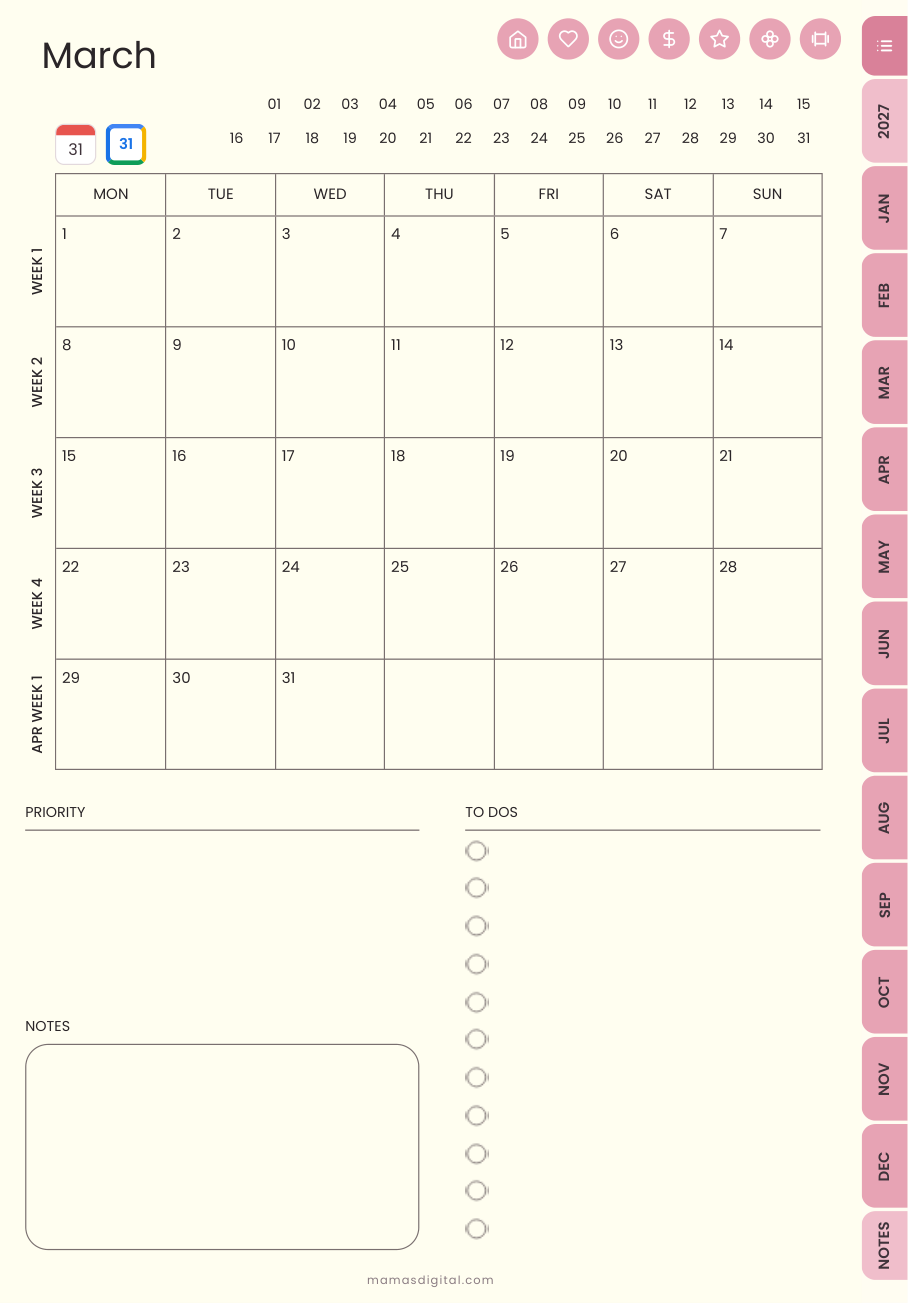
- Monthly calendars: MON to SUN columns, with a tappable week label down the side that opens that week.
- Mini calendars on the month and year pages use the same order, so nothing jumps around.

What’s inside
Everything in the 2027 diary
| Section | What you get | Handy for |
|---|---|---|
| Year at a Glance | All 12 months on one page. Tap any date to open that day. | Marking school holidays, birthdays and trips at the start of the year |
| Monthly (12) | Monthly calendar, Monthly Reflection and Monthly Budget for each month | A 20-minute reset at the end of each month |
| Weekly (53) | Rows for Mum, Partner, Kids and Meals, plus To Do, Grocery Quick List and Me-Time | Sunday-night planning for the week ahead |
| Daily (365) | Hourly schedule, Top 3, To Do, meals, Kids’ Notes, water, mood and gratitude | Busy days with appointments and pick-ups |
| Kids (12 pages) | School Info & Teachers, Class Schedule, Homework Tracker, Grade Tracker (4 terms), Lunchbox Planner and more | Keeping each child’s school year in one spot |
| Home & Family (12 pages) | Weekly Meal Planner, Grocery List by aisle, Cleaning Checklist, Babysitter Info, Travel & Packing | Meal prep, the weekly shop and holiday packing |
| Money (9 pages) | Yearly Budget, Income Tracker, Bill Payment Checklist, Subscription Tracker, Debt Snowball | Keeping on top of bills, subscriptions and savings goals |
| Mama Time, Wellness, Fitness, Goals, Notes | Brain Dump, Mental Load List, Self-Care Menu, trackers and 6 note styles | Looking after you, not just everyone else |
A few page names inside the PDF use US spelling (for example, “Behavior & Rewards”). The dates, weeks and layout are all Monday start.
School terms
Planning your year around the four school terms
Australian schools run on four terms with holidays in between, but the exact dates differ by state and territory, and private and Catholic schools sometimes set their own. Rather than print dates that might not match your school, the diary leaves you room to add your own. It takes about five minutes:
Find your 2027 dates
Check your state or territory education department website, or your school’s newsletter or app. Note the first and last day of each term, plus any pupil-free days.
Mark them on Year at a Glance
Circle or highlight the first and last day of each term. Holidays will stand out at a glance when you book appointments or leave.
Add the big days to each month
On each monthly calendar, add the swimming carnival, athletics day, parent-teacher interviews, school photos and the last day of term.
Set up the Grade Tracker by term
The Grade Tracker already has four term columns. Add each child’s subjects at the start of Term 1, then fill it in as reports come home.
Worked example
A real week in Term 1, filled in
Here’s how one family might fill in a week in early Term 1. The names and activities are only an example, so swap in your own.
| Day | Mum | Kids | Meals |
|---|---|---|---|
| Mon | Work 9–3, pick-up 3:10 | Library bags in | Spag bol (double batch) |
| Tue | Dentist 4:30 | Swimming lessons 5:00 | Leftover spag bol |
| Wed | Work from home | School photos: uniform ironed | Sausage sizzle night |
| Thu | Big shop after drop-off | Footy training 5:30 | Slow-cooker chicken |
| Fri | Pay day: check budget | Canteen lunch order | Homemade pizza |
| Sat | Markets early | Netball 9:00, party 2:00 | BBQ |
| Sun | Plan next week (15 min) | Pack bags for Monday | Roast |
On Sunday evening, tap into next week, copy over anything that didn’t get done, and add the meals to the Grocery Quick List before the shop.
Digital or paper?
Digital diary vs a paper diary
| Digital diary (this one) | Paper diary | |
|---|---|---|
| Where it lives | On your tablet, with you whenever your iPad is | In your bag or on the bench |
| Getting around | Tap any date, week or section to jump there | Flip pages and use a ribbon or sticky tabs |
| Mistakes | Erase, move or duplicate pages as often as you like | Liquid paper or crossing out |
| Extra pages | 68 extras built in, and you can duplicate any page | Limited to what’s printed |
| Delivery | Instant download, nothing posted | Buy in store or wait for delivery |
| Best for | Mums who already use a tablet with a stylus | Mums who love pen on paper or don’t use a tablet |
Price in AUD
What it costs in Australian dollars
The diary is US$21.99, which is roughly A$32 at current exchange rates. Use the AUD A$ link at the top of any page to see approximate AUD prices across the shop. Checkout is processed in US dollars, so the exact AUD amount on your statement depends on your bank’s rate and any fees it charges for overseas purchases.
It’s a one-off purchase with no subscription. You download one PDF straight after checkout and keep it.
Setup
Set it up in 10 minutes
Download the PDF
After checkout, download the file on your tablet. It’s about 28 MB, so use Wi-Fi.
Open it in your app
Tap Share, then choose GoodNotes, Notability or another PDF app that supports links. Import it as a new document.
Test a few links
Tap a month tab, then a date. If nothing happens, switch to your app’s read or view mode to use the links.
Add your term dates and birthdays
Mark them on Year at a Glance first. Then the rest of the year is ready.
New to digital planning? Read our guide how to use a digital planner.
Monday start · Mum edition
Mama’s Family Planner 2027
US$21.99 (about A$32)
545 hyperlinked pages, dated for all of 2027, with weeks running Monday to Sunday.
See the diaryFAQ
Questions Aussie mums ask
Is this a Monday-start diary?
Yes. Every weekly spread and monthly calendar runs Monday to Sunday, and the mini calendars on the month and year pages use the same order.
How much is it in Australian dollars?
The price is US$21.99, which is roughly A$32 at current exchange rates. You can switch the shop to show approximate AUD prices, but checkout is processed in US dollars and your bank sets the final AUD amount.
Does it cover the whole 2027 school year?
Yes. It is dated 1 January to 31 December 2027, so all four school terms are inside. Term dates differ by state and sector, so copy yours from your state education department or your school newsletter.
Will it work on my iPad or Android tablet?
Yes. Use GoodNotes, Notability, Noteshelf, Xodo, Samsung Notes, Flexcil or any PDF app that supports links.
Is it a printed diary?
No. It is a single hyperlinked PDF you download straight after checkout. Nothing is posted, so there is no shipping wait or cost to Australia.
What is different from the Sunday-start edition?
Weeks start on Monday and the family row is labelled Mum. All other pages, links and extras are the same.